Code Template: Remove Link


|
Code Template: Remove Link |
|
This template can be used to remove an existing Send To link. If the link doesn't exist, no harm is done.
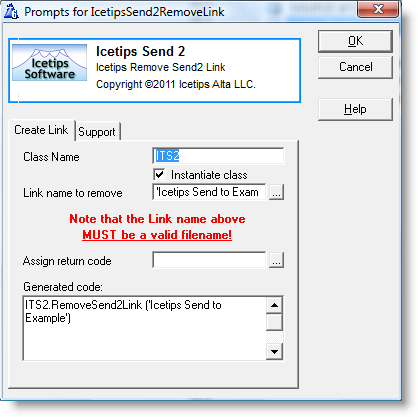
Class Name
Name used for the class instance. It defaults to ITS2.
Instantiate Class
Check this if you want the template to create an instance of the class, i.e.
ITS2 ITSend2Class
If you get compiler errors or compiler warnings, check this first to make sure that it is checked or unchecked when appropriate. Defaults to checked.
Link name to remove
This is the name of the link file, as it is specified in the "Create Link" template. This must be a valid filename and should be specified in single quotes or as a variable. Use the [...] button to select a variable.
Assign return code
You can optionally specify a variable to receive the return value from the RemoveSend2Link method call. This is optional. The return value is an ErrorCode() value from the REMOVE statement that deletes the .lnk file. Use the [...] button to select a variable for the return value.
Generated code
This textbox shows you exactly what code is being generated into the application. Makes it easy to see exactly what is going on.