Code Template: Load Files from Command Line


|
Code Template: Load Files from Command Line |
|
This template is used to load the files from the command line when they are sent to the program. You specify a local queue and a field in the queue to receive the filename and a single call to the DumpFilesInQ method takes care of it all. This makes it easy to move the data to a local queue and display it in a listbox for example. An alternative is to call the Send2FileList() method directly to load the FileList class queue and access it directly.
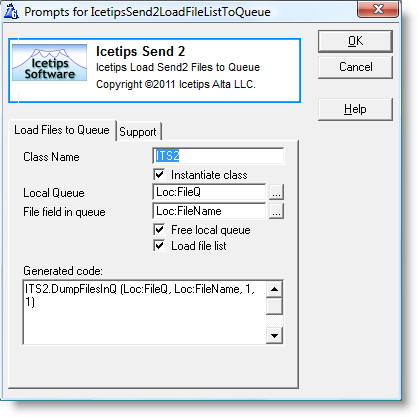
Class Name
Name used for the class instance. It defaults to ITS2.
Instantiate Class
Check this if you want the template to create an instance of the class, i.e.
ITS2 ITSend2Class
If you get compiler errors or compiler warnings, check this first to make sure that it is checked or unchecked when appropriate. Defaults to checked.
Local Queue
Queue to receive the file list. Use the [...] button to select a queue.
Field in queue
A field in the queue selected in the "Local Queue" field above. This field will receive the file path. Use the [...] button to select a field in the queue.
Free local queue
If this is checked, the DumpFilesInQ method will free the queue passed in to it. Defaults to checked.
Load file list
If this is not checked the list of files is not loaded. Can be used if you need to load the same file list into more than one queue and you don't want to re-load it.
Generated code
This textbox shows you exactly what code is being generated into the application. Makes it easy to see exactly what is going on.