 |
Icetips Utilities Documentation
5/15/2016 Code Template: Store compile date/time in variables |
|
Previous Top Next |
This template will store the compile date and/or time in variables that you specify. It can also store the concatenated date/time in a single string variable formatted the way you want it.
Note that this may not get updated if the procedure you add this to hasn't changed. One way to force the update would be to delete the source module for this procedure before you generate and compile the application. If you are using automated building process, such as Build Automator it makes it easier to do that.
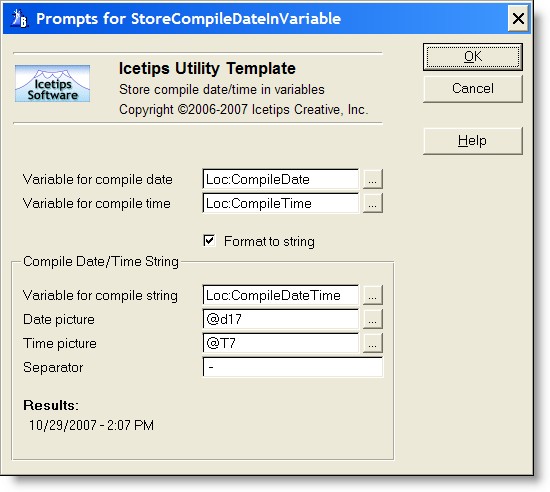
| Variable for compile date | This variable receives the compile date value. This value is created when the application code is generated and does not change at runtime. This variable should be a DATE or a LONG variable. |
| Variable for compile time | This variable receives the compile time value. This value is created when the application code is generated and does not change at runtime. This variable should be a TIME or a LONG variable. |
| Format to string | When this checkbox is checked, it enables the "Compile Date/Time String" group below. This allows you to place the formatted compile date and or time into a single string variable to place on a window or a report. |
| Variable for compile string | This variable receives the formatted compile date and/or time values depending on the pictures specified for each variable. This should be a STRING or CSTRING variable. The required size varies based on format picture that you choose. |
| Date picture | The format picture for the date. Type in a different picture if you need or use the [...] button to select a new picture. |
| Time picture | The format picture for the time. Type in a different picture if you need or use the [...] button to select a new picture. |
| Separator | String that is placed between the date and the time. |
| Results | Shows the formatted date and time as it will appear on the window or report. |
See also: