Clarion 6 Support


|
Clarion 6 Support |
|
The Clarion 6 Support extension prepares the Icetips Previewer for using the Report Target selection templates and the Save Buttons and Save As Button control templates.
Note: This template is ONLY available is you have added one or more of the Softvelocity target templates to your application. If you have not, then you are not going to find this template in the list of extension templates to apply!
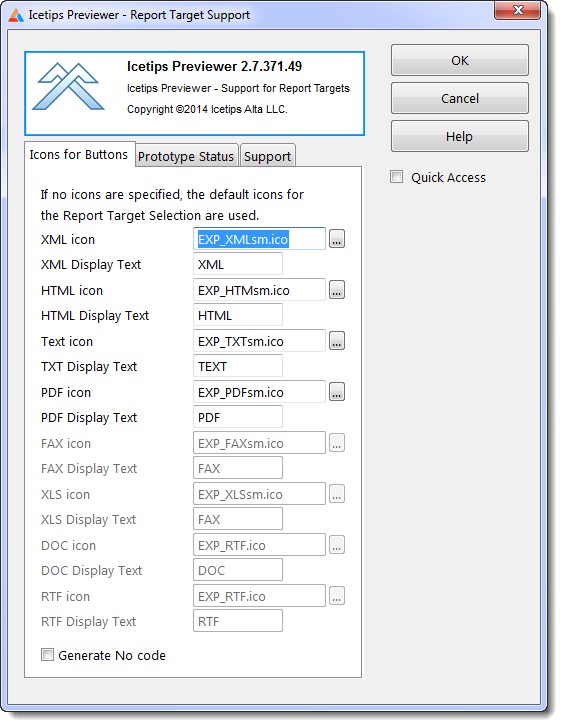
XML icon
This allows you to select an icon for the XML export button. It defaults to EXP_XMLsm.ico.
XML Display Text
This is used to match the names with the target selector names. Generally this should never need to be changed.
HTML icon
This allows you to select an icon for the HTML export button. It defaults to EXP_HTMLsm.ico.
HTML Display Text
This is used to match the names with the target selector names. Generally this should never need to be changed.
Text icon
This allows you to select an icon for the TXT export button. It defaults to EXP_TXTsm.ico.
TXT Display Text
This is used to match the names with the target selector names. Generally this should never need to be changed.
PDF icon
This allows you to select an icon for the PDF export button. It defaults to EXP_PDFsm.ico.
PDF Display Text
This is used to match the names with the target selector names. Generally this should never need to be changed.
FAX icon
This allows you to select an icon for the FAX export button. It defaults to EXP_FAXsm.ico.
FAX Display Text
This is used to match the names with the target selector names. Generally this should never need to be changed.
Generate No code
Check this if you do not want this template to generate any code into the Previewer procedure.
This template requires that an additional parameter be added to the prototype/parameters of the Icetips Previewer procedure:
<*ReportTargetSelectorClass pTargetSelector>
The template will warn if the prototype is not correctly set up.
See also the Save Buttons and Save As Button control templates for more information.