ABC: Set a value in a browse without a form or Edit in Place 2004-02-04 -- Arnor Baldvinsson A friend of mine asked me how he could update a single field in a browse without calling
the form or use Edit in Place.
The field in question was a simple byte field which was shown in the browse with a
checkbox icon, on or off depending on the value of the field. This is the code I came up
with and it seems to work just fine. Put this code into the BrowseClass ASK method,
before the parent call:
   If ?Browse:1{PROPLIST:MouseDownField} = 1 ! First column only
     BRW1.UpdateBuffer
     CUS:isrecordtagged = Choose(CUS:isrecordtagged=False,True,False)
     If Access:Customers.Update() = LEVEL:Benign
       BRW1.ResetFromFile
       RETURN(LEVEL:Benign)
     End
     RETURN(LEVEL:Notify)
   End
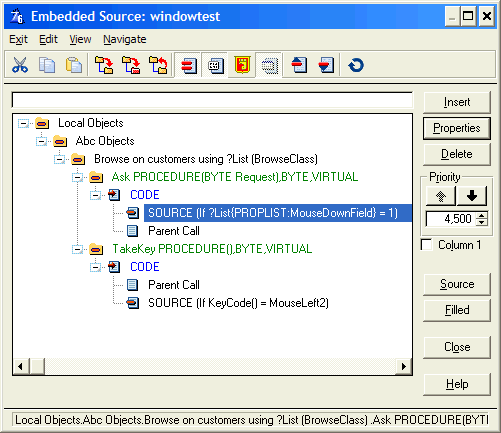
If you want this on a window without update buttons, you need to manually call the ASK
method. Add the following code to the TakeKey method of the Browse object:
Fix to a problem with double clicking 2004-07-19 � Arnor Baldvinsson Reported by Kelly E Major:
I created a quick test program and this code works, but it has a problem. If you try to use one of
the update buttons after double clicking to change a field it will change the field of the active
record in the list instead of calling the form. I added this line of code right after the first
if...
?Browse:1{PROPLIST:MouseDownField} = 0
and it seemed to resolve that problem but I have not tested extensively. Now I just need to get it
working with a single click and my clients will be happy.
Printed October 25, 2026, 12:46 am This article has been viewed/printed 36297 times. Google search has resulted in 11 hits on this article since January 25, 2004. |