Icetips Send 2


|
Icetips Send 2 |
|
Welcome to Icetips Send 2
This documentation is for build 1.0.111 released on May 04, 2012. Please refer to the "Support" tab on the templates and commented headers in the class files to verify that you have the correct documentation for the build that you are using.
Send 2:
| • | Creates a Send To shortcut in the "Send To" folder. |
| • | Processes a list of files or folders sent to the program specified in the Send To link. |
| • | Removes Send To shortcut from the "Send To" folder. |
| • | Works with both ABC and Clarion (Legacy) templates. |
| • | Works with Clarion 6, 7 and 8. |
The Icetips Send 2 is a set of template and class that are used to create "Send To" shortcuts for Windows Explorer and process file list sent to the specified program
Send To is an option for Windows Explorer that allows the user to select files and/or folders and use the context menu in Windows Explorer to send the names of the selected files to a program that is set up to receive this information.
The files and folders are sent as command line parameters and as such are limited to the maximum size of the command line, which differs from one version of Windows to another.
Send 2 requires the Icetips Runtime Library (IRTL) DLL to be included and distributed with your program. The name of the dll is IT_RTL.dll and it should be located in the same folder as your executable or other supporting dlls that your system uses. The prototypes for the Icetips Runtime Library DLL are found in the IT_RTL_Prototypes.inc file in your 3rdParty\Libsrc folder in Clarion 6 and older, or in your accessory\libsrc\win folder in Clarion 7 and Clarion 8. The Icetips Runtime Library DLL is compiled using Visual C++ and can therefore be used with any version of Clarion as well as other programming languages. IT_RTL.lib is also included and is installed into your 3rdParty\Lib folder in Clarion 6 and older, or in your accessory\lib\win in Clarion 7 and Clarion 8. At the time of writing (January 4, 2012) the source for the Icetips Runtime Library is not available for download but it will be made available to Icetips users with a valid subscription.
Note that the classes are NOT ABC compliant and can be used in any kind of projects, included purely handcoded projects.
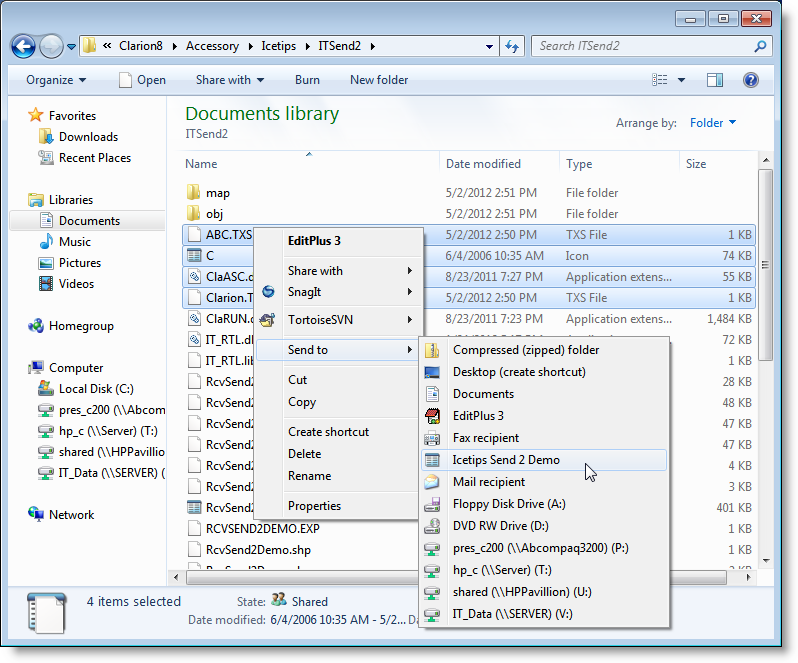
This screenshot shows the "Send to" menu in Windows Explorer after the Icetips Send 2 Demo has been run, i.e. the SetupSend2Demo.app in your example directory.