Adding the templates


|
Adding the templates |
|
This chapter shows you how to add the POToolbar global and control template.
Global template |
 Press the "Global"-button

Click "Extensions"
Click "Insert"
Choose "POToolbarGlobal - POToolbar Global"

Click "Ok" to close global settings.
Toolbar control template |
The toolbar template can be populated into an existing AppFrame Clarion toolbar, or directly into a Window.
Click the "Control Template" toolbutton

Choose the template "POToolbar - Toolbar Control"

Click somewhere inside the Clarion toolbar or Window to position the PowerToolbar-control.
MDI Client template |
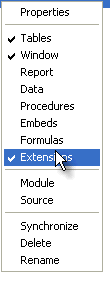
Right-click the window-procedure you'd like to add the template to, and select "Extensions"
Choose the "PowerToolbarMDIClient - PowerToolbar MDI Client" template

Click "Ok" to close the extensions dialog.